
There is so much we can learn and know about cricut blades.
If you’re searching for 10 things to know about cricut blades, start here: Cricut blades are not one-size-fits-all, and the right blade depends on your material, your machine, and the cut setting you use. Most cutting problems, like tearing, dragging, or incomplete cuts, come from using the wrong blade type, a dull blade, or incorrect pressure settings.
Key Takeaways
- Fine-Point Blade is the everyday blade for paper, vinyl, and iron-on.
- Deep-Point Blade handles thicker materials like magnet sheets, thick cardstock, and some foam.
- Bonded Fabric Blade is meant for bonded fabric, not regular loose fabric.
- Knife Blade is for thicker materials and works only with certain Cricut Maker models.
- Rotary Blade cuts fabric without a backing and is different from a drag blade.
- A dull blade causes torn edges, skipped cuts, and messy corners.
- Blade type and material setting matter just as much as blade sharpness.
- Not every blade works in every Cricut machine.
- A quick test cut can save both material and time.
- Cleaning and storing blades properly helps them last longer. ✂️
What are the 10 things to know about cricut blades before you buy or use one?
The most important things to know are blade types, machine compatibility, material matching, and when to replace a blade. If you understand those four areas, you can avoid most beginner mistakes.
Here are the 10 things to know about cricut blades in plain English:
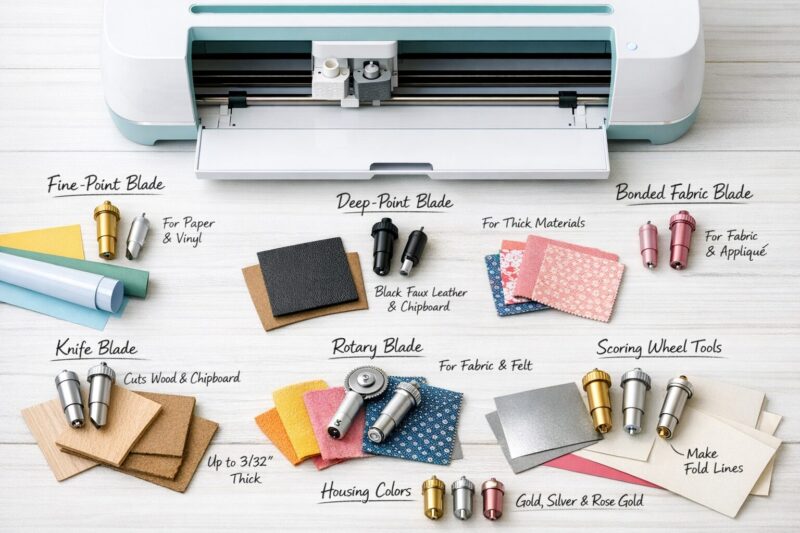
- There are several Cricut blade types, and each has a specific job.
- The Fine-Point Blade is the default choice for many common craft materials.
- Deep-Point Blades are for thicker materials, not for everyday paper cuts.
- Bonded Fabric Blades only work well on bonded fabric.
- Knife Blade and Rotary Blade are specialty tools, mainly for Maker machines.
- Machine compatibility matters, because not every blade fits every machine.
- Blade housing colors can help identify tools, but always check the label too.
- Cut settings affect results as much as the blade itself.
- Blades wear out, and dull blades show clear signs.
- Maintenance and test cuts can prevent wasted materials.
A Cricut blade is only half the cutting system. The other half is the material setting you choose.

Which Cricut blade should you use for each material?
Use a Fine-Point Blade for standard materials like cardstock, vinyl, and iron-on. Choose a Deep-Point Blade, Bonded Fabric Blade, Knife Blade, or Rotary Blade only when the material calls for it.
Quick blade guide
| Blade type | Best for | Good fit if… | Common mistake |
|---|---|---|---|
| Fine-Point Blade | Paper, vinyl, iron-on, light cardstock | You make decals, cards, labels | Using it on very thick material |
| Deep-Point Blade | Thick cardstock, poster board, some foam, magnet sheets | You need more blade exposure | Using it for basic vinyl cuts |
| Bonded Fabric Blade | Bonded fabric | Fabric has backing or bonding | Using it on plain woven fabric |
| Rotary Blade | Unbonded fabric, delicate textiles | You want fabric cuts without backing | Expecting it to cut wood or board |
| Knife Blade | Chipboard, basswood, thicker dense materials | You need multiple passes on thick media | Trying to use it in incompatible machines |
Decision rule
- Choose Fine-Point if your material bends easily and is common in paper or vinyl crafting.
- Choose Deep-Point if your material is noticeably thicker and the Fine-Point struggles.
- Choose Rotary if you’re cutting soft fabric without stabilizer.
- Choose Knife Blade if you’re cutting thick, rigid materials approved by Cricut for that blade.
Quick example
If I’m cutting adhesive vinyl for labels, I use a Fine-Point Blade. If I switch to chipboard, I do not keep the same setup. I switch tools and check machine compatibility first.
Are Cricut blades compatible with every Cricut machine?
No, Cricut blades are not universally compatible across all machines. Some blades fit Explore models, while others require a Maker series machine with Adaptive Tool System support.
Basic compatibility overview
- Fine-Point Blade: widely used across many Cricut machines
- Deep-Point Blade: commonly compatible with Explore and Maker models
- Bonded Fabric Blade: used in machines that accept that blade housing
- Knife Blade: generally limited to compatible Cricut Maker machines
- Rotary Blade: used with Maker machines that support adaptive tools
Choose X if…
- Choose Explore if your projects are mostly paper, vinyl, and iron-on.
- Choose Maker if you want access to specialty tools like the Knife Blade or Rotary Blade.
Common mistake
A common beginner mistake is buying a specialty blade first and then realizing the machine doesn’t support it. Always check the machine model before ordering accessories.
Why does the right cut setting matter as much as the blade?
The cut setting tells the machine how much pressure, speed, and how many passes to use. Even a sharp Cricut blade can cut badly if the material setting is wrong.
What affects your cut result
- Material thickness
- Material density
- Blade sharpness
- Mat grip
- Machine calibration
- Selected material setting in Design Space
Signs your settings are off
- Too much pressure: torn paper, curled cuts, cut-through backing
- Too little pressure: incomplete cuts, corners still attached
- Wrong blade-setting combo: drag marks, jagged edges, repeated snagging
Quick checklist
- Pick the correct material in Design Space.
- Confirm the blade type.
- Load the right mat grip.
- Run a small test cut.
- Adjust pressure only if needed.
How do you know when a Cricut blade is dull or damaged?
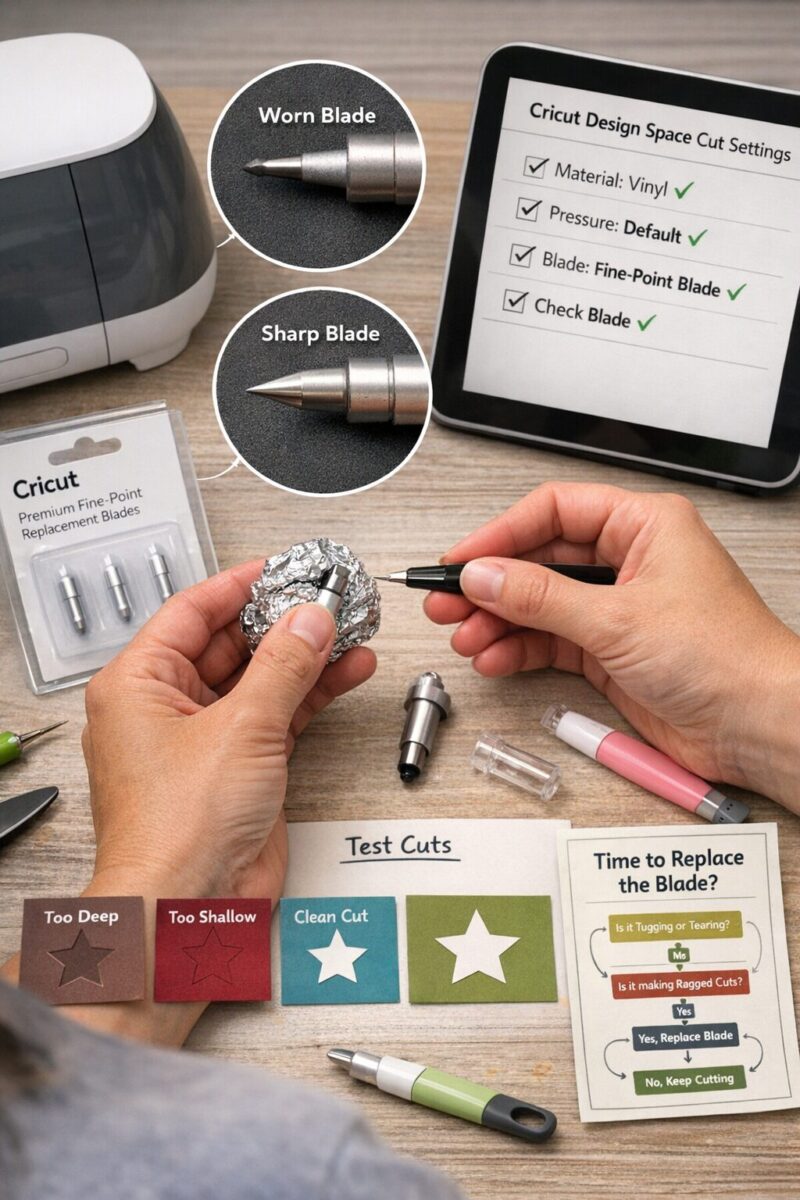
A dull Cricut blade usually leaves rough edges, misses tiny details, or starts dragging through the material. If the same project used to cut cleanly and now does not, the blade is a likely cause.
Common signs of a worn blade
- Paper tears instead of cutting cleanly
- Vinyl corners lift or snag
- Intricate shapes fail more often
- You need extra pressure for materials that used to cut well
- Cuts look fuzzy or uneven
Edge case
If a new blade still cuts poorly, the problem may not be the blade. Check:
- debris inside the blade housing
- an old or dirty mat
- wrong material setting
- warped or poor-quality material
Practical tip
Before replacing a blade, I like to do a test cut on scrap material. If the result is still poor after cleaning and checking settings, replacement makes sense.
How can you make Cricut blades last longer?
You can help Cricut blades last longer by cutting clean materials, using the right mat, and cleaning the blade regularly. Blade life depends heavily on what you cut and how often you cut it.
Best habits for longer blade life
- Use the correct blade for the material
- Keep glitter, paper dust, and fibers from building up
- Store blades in a dry, safe place
- Replace worn mats so material doesn’t shift
- Avoid cutting unsupported materials not recommended for your blade
Common mistake
Using one blade for everything shortens blade life. If you cut a lot of glitter cardstock or abrasive material, keep a separate blade for delicate paper projects.
Simple cleaning tip
Many crafters gently press the blade into a balled-up piece of aluminum foil to remove debris. That can help with buildup, but it does not resharpen the blade.
What does each Cricut specialty blade do?
Specialty blades expand what your machine can cut, but only when the material and machine match the tool. They are useful for advanced projects, not always necessary for beginners.
Specialty tools to know
Knife Blade
Best for thicker, rigid materials like chipboard and basswood approved for compatible Maker machines.
Choose Knife Blade if: you want structural projects, signs, or small 3D builds.
Rotary Blade
Best for fabric and soft materials without bonded backing.
Choose Rotary Blade if: you sew, quilt, or cut fabric shapes often.
Scoring tools
Not blades in the cutting sense, but often grouped with Cricut tools. They create fold lines instead of cutting through material.
Choose scoring tools if: you make cards, boxes, or folded paper crafts.
Pros and cons of specialty blades
Pros
- More material options
- Cleaner results on the right media
- Better for niche craft projects
Cons
- Higher cost
- Limited machine compatibility
- More setup and learning time
What mistakes do beginners make with Cricut blades?
Most beginner blade mistakes come down to guessing instead of checking. The easiest fix is to match the blade, material, mat, and machine before you start.
Top mistakes to avoid
- Using a Fine-Point Blade on thick material
- Forgetting to change settings after switching materials
- Assuming all blades fit all machines
- Cutting with a dirty blade housing
- Skipping a test cut on expensive material
- Using a worn mat that lets material slide
Mini example
If your cardstock is tearing, don’t assume you need a new machine. Try this first:
- check if the blade is dirty
- lower pressure one step
- use a cleaner mat
- replace the blade if cuts still look rough
How do you troubleshoot Cricut blade problems fast?
Start with the easiest checks first: blade, housing, mat, material setting, and test cut. Most Cricut blade issues can be narrowed down in a few minutes.
Fast troubleshooting checklist
- Remove the blade and check for debris.
- Confirm you loaded the correct blade type.
- Recheck the material setting in Design Space.
- Make sure the mat still grips the material well.
- Try a small test shape on scrap.
- Replace the blade if the same issue continues.
If your cut is…
- Too shallow: increase pressure or replace blade
- Too deep: reduce pressure or confirm material setting
- Jagged: clean or replace blade, secure material better
- Off-track: check mat stickiness and material flatness
FAQ about 10 things to know about cricut blades
What blade comes standard with most Cricut machines?
Most Cricut machines commonly use a Fine-Point Blade for general cutting tasks like paper and vinyl.
Can I use one Cricut blade for every material?
No, one Cricut blade does not suit every material. Thicker, denser, or softer materials often need a different blade type.
How often should I replace a Cricut blade?
Replace a Cricut blade when cuts become rough, incomplete, or inconsistent after cleaning and checking settings.
Is the Deep-Point Blade better than the Fine-Point Blade?
No, the Deep-Point Blade is not better for everything. It is only better for thicker materials that need more blade exposure.
Can a dull blade ruin materials?
Yes, a dull blade can tear paper, drag vinyl, and waste expensive materials through uneven cuts.
Does aluminum foil sharpen a Cricut blade?
No, aluminum foil may help remove debris, but it does not truly sharpen a Cricut blade.
Do I need a Knife Blade as a beginner?
No, most beginners do not need a Knife Blade right away. A Fine-Point Blade covers many basic craft projects.
Why is my Cricut cutting through the backing paper?
Your Cricut may be using too much pressure, the wrong material setting, or a blade-depth combination that is too aggressive.
Conclusion
If you remember only a few of these 10 things to know about cricut blades, remember this: match the blade to the material, check machine compatibility, and don’t ignore cut settings. Those three steps solve most problems before they start.
If you’re new, begin with the Fine-Point Blade and learn how it behaves with paper, vinyl, and iron-on. If you work with fabric or thick boards, then add specialty blades based on your actual projects, not just curiosity. My advice is simple: do a test cut, keep your blade clean, and replace blades before a big project when results start slipping.
Next steps
- Check which Cricut machine you own
- Make a list of the materials you cut most
- Buy the blade that matches those materials
- Save a small sheet of scrap for test cuts
- Label older blades for rough materials only

A Teacher with 5 years of experience. Our Expertise, is reliable to meet your full Academic development needs . Worked on many crafts and construction projects offering services from design to development to deployment over the years. You will find many of my works in my business portfolio on request.